Showing posts with label EdTech. Show all posts

Tuesday, April 28, 2015

Techie Tuesday - Version 2.7 - Reviewing for Finals with Technology

Good day to you all!

It is almost the end of April which means that final exams will be here before you know it.  I believe that our kids learn so much, but then forget it if they do not use it for months at a time.  (Makes sense right?)  Last year I took the time and started reviewing for finals after each chapter test and during the month of May.  This greatly helped my students score much higher on the semester exams.  Which directly affected my SLO score.  (Woohoo!)  So I thought I would give you 3 fun technology tools that you can also use to get your students prepared for their final exams.

1.  ExitTicket
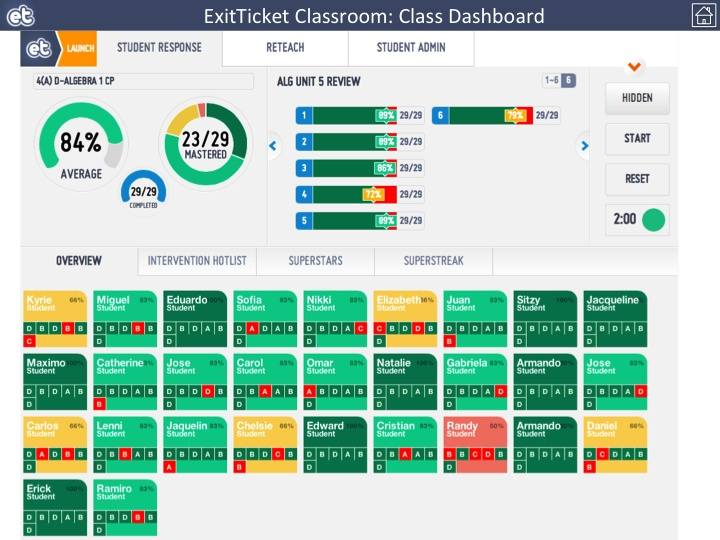
This is my FAVORITE tool I like to use in my classroom.  Aside from the pretty colors, it gives the teacher, and the students, tremendous and immediate feedback!  There is a student app for ExitTicket, but there is not a teacher app.  There are 2 different modes--Presentation mode and Teacher mode.  I leave the "Presentation Mode" on the front board as no student names are shown.  Students can then see how the class is doing as a whole.  I pull up "Teacher Mode" on Google Chrome on my iPad as I walk around the room.  This allows me to see a heat map of how well the students are doing during the assessment.  It allows me to step in and help a student if they are having difficulty as well.  

Like I said before the best part of ExitTicket is the data that you get back.  Below is an image of the class data and question data that is returned to you and the students as they work through the questions.
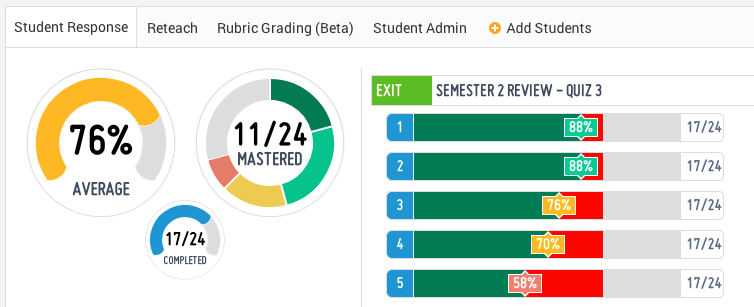
As evidenced by the data, I need to review questions 3-5, but I do not need to spend as much time on questions 1 and 2.  This helps me plan my review.  The class average gives the teacher a quick glance at how the students are doing on the review as well.  The average is not too bad, but I should be worried about how many "mastered" the content.


2.  Socrative - Online Quizzes, Exit Tickets, & Space Race
Socrative is a wonderful online quiz platform that teachers use across the world.  It is both an app AND a website.  There is a Teacher App for you, and a Student App for the students to use.  You may choose to have the students attempt your questions via the phone app or by using their laptop.  If they use their laptop, then they need to go to the web address:  www.socrative.com  Here they will use the Room Number that you provide to the class.  Then you can choose to have the students participate in the quiz as a Teacher Run activity, or Student Run Activity.


As the teacher, you can create multiple choice, true/false, and short answer questions.  They have also added the function of being able to include an image with your question.  Once the activity is complete, the teacher can download a report via email or through Excel.  Teachers can use Socrative as an Entrance Ticket to check student prior knowledge, or they can use it as an Exit Ticket to see what the students learned during the day.  My favorite feature is the Space Race.  It really gets the competitive juices flowing for the students!  


3.  Kahoot is a FREE blended learning and online gaming platform that is available for all.  If you have ever been to BW3s, you will find that Kahoot is similar to the NTN Buzztime game that they offer. Teachers can create their own multiple-choice questions that students must answer either by using their smartphones or their laptops.  


Students will need to go to the web address:  kahoot.it  This will get them to the game lobby where they will input the game pin provided by the teacher.


They will then be prompted to insert a "nickname". Once all the students have given a nickname, the teacher may start the game.  THIS is where the fun begins!  Once the teacher starts the game, the students get to see the question for about 3 seconds, then the multiple-choice options will appear. Students will be rewarded points for each correct answer, PLUS how fast they answer the question. After all students have answered the question, then the top 5 scores will be displayed for all to see. Students really enjoy being able compete for the top 5 spots!  

I wish you and your students the best of luck with the upcoming final exams!

Tuesday, March 17, 2015

Techie Tuesday - Version 2.6 - Engaging Students with Alternative Technologies

Hello, all.  It has been a little while since I last posted.  I have had plenty of "fun" activities that have taken up some time in my life lately that I'd like to share.  Now I can't share all of it because I am sworn to secrecy, as is Marcus P., but I can tell you, it's been pretty awesome!!

For the past 4+ months Marcus and I have had the kind of professional development experience that most educators dream about.  We have met some of the most inspirational educators and advocates for all ages of students.  We have met with representatives from the Indiana Department of Education.  We have planned lessons with some of the hardest working individuals that Indiana has to offer.  We have traveled to Indianapolis multiple times.  We have even made a trip out to California to fly drones on a beach and make a video with a GoPro in one of the tallest buildings in Los Angeles.  We have worked countless hours, on top of our normal teaching job, to create something that is original and powerful for teachers and students alike.  In due time, you will get to see some of the work that our group has created.  But for the present time, I will let you in on one little secret...each lesson plan hinges on one major hook--technology!

Technology is all around us.  It is embedded in our every day lives.  I bet as you are reading this, it is probably on your desktop...or your iPad...or your phone.  Heck, it may even be from a link shared on Twitter.  Regardless of how you read this post, it is online and it is accessible everywhere.  This is how students live their lives.  They have profiles on Twitter, Facebook, Instagram, and SnapChat just to name a few.  Some may even have Google+ profiles.  And so do you!  You also have a Google Drive.  You have your own YouTube channel.  And you also have your own Gmail account.  Did you know that?!?!

So how can we leverage these technologies to better engage our students?  It takes time.  It takes time to be able to think "outside the box".  It takes working with one another to look at a lesson plan and discuss "How can this be better?"  "How can I get my students engaged more in class?"  You must use technology for more than how it has been used in the past.  I will let you know, it is not by just having a student word process a paper.  That is not the best use of technology in your classroom.  How many years have we been doing that?  I know I was doing it in high school 20 years ago.  (Oh man, I just dated myself.)  Instead, have them start their own blog for your class.  Have them write for a worldwide audience!  Everyone reads the school newspaper.  But does everyone read a student narrative on Julius Caesar?  How can this lesson be better with technology?  Marcus did a wonderful job incorporating Sphero balls and mazes in a lesson from the book, Flowers with Algernon.  He made the comment that his students have never been so engaged.  (If you want the whole scoop then you need to speak with him on the lesson.)

So this brings me back to the point, "How can we get our students more engaged?"  The ultimate solution for this teacher is technology.  This is the world we live in now, folks.  It is the world our students need to be prepared for.  And it is the world in which we should be preparing them to be successful.

Tuesday, September 2, 2014

Techie Tuesday - Version 2.1 - What Do YOU Want From Professional Development!

For many years, schools and teachers in Indiana had professional development days built into their school schedule.  Unfortunately, a few years ago these days (PD days) were taken away and teachers had to find new ways to keep up-to-date with changes in standards and technologies.  For a lot of us it is difficult to stay after school for an extra hour and devote time to learn for ourselves.  Personally, I usually need to leave school no later than 4 PM in order to pick up a couple of my kids that happen to be in two different locations. But whether it is grading, family obligations, coaching, or a 2nd job, our time is valuable after 3:30.  That brings me to my question for you.


What do YOU want from professional development?  

I spent a lot of time this summer attending and presenting at conferences this past summer.  (If you did not have a chance to attend any of the Summer of eLearning conferences hosted by the Indiana DOE, I would highly recommend you look into attending a local one next summer.  Hopefully here at Twin Lakes!)  It was great to hear the keynote speakers and listen to their ideas for technology integration into the classroom.  There were multiple classroom teachers that hosted hour-long breakout sessions on specific topics.  Their passion for their profession was very evident in their presentations.  Most of them even had sensible ideas that would work well in our own classrooms.  :)


After sitting through multiple sessions I was able to come to one major realization for each session I
attended--always leave the audience with something they can use TODAY!  Throughout this year, the technology department is planning on hosting multiple professional development opportunities this year.  We have some great ideas planned for you that will cover Canvas, online assessments, video/photo editing, etc.  However, we are always open to ideas of items you would like to learn about.

So this brings me back to my original question--what do YOU want from professional development?  Let members of the tech committee know what would make your life easier and we will work to find a possible solution for you.  If you would like some help during your prep period, or before or after school, do not hesitate to contact us.  If you cannot make an afternoon session, let us know and we will make contact with you the next day.  Maybe you would like a video of the session to watch at a later time, we will work on making that happen as well.  We are all in this together, so let's learn together and make our school year, plus our students, a memorable and technological one!

Tuesday, April 15, 2014

Techie Tuesday Version 1.11 - Using Twitter to Connect with Today's Learners

As most teachers do, I like to reflect upon my days as a high school student.  I look back upon what my interests, passions, and future plans were when I was a teen.  Oh how things have changed!  Often times I think of how bored I became in classes in which I was not engaged.  Have you ever wondered what you would be like in today's education setting?  Have you ever wondered how engaged today's teen is when they come to your class?  Maybe you can take a couple of tips from this video.  Take a look at this and see if anything pops out at you.


To me, that is pretty useful information for any teacher to know!  For the past couple of years I have been using Twitter to communicate with my students OUTSIDE of class.  This is the easiest and most productive way to communicate with our 21st Century Learners.  Believe it or not, there are more students that have Twitter over email.  Below are the best methods I use when implementing Twitter for my classroom.

#1 Golden Rule for Twitter-
I ALWAYS tell my students that they can follow me, but I WILL NOT follow them back.  Aside from the legal liabilities we would have as teachers, I do not need to know all the high school gossip.  I think this also gives the kids some faith in me that if they post something (even if they shouldn't have) that their teachers will not know about it.  Believe it or not, most students actually care what we think!

Reminders-
Frequently I will remind students to check class websites (i.e. - TL Campus or WebAssign) for homework or helpful videos.  As teachers, we need to guide our students to resources that help them understand new material they learned in classes.  I have sent some individual students specific websites that they can use to help them with a new topic.  I will also tweet out helpful websites or other "interesting" tidbits about math that they may find interesting.


Answering Student Questions-
The use of a smartphone with a camera is one of the most useful tools a student can use to ask teachers questions when they have them.  Students have really taken to the ability of asking me questions they may have while working on their homework.  I have had great success with students sending me pictures of their work where I can see what they have done.  This is the best way for me to review their work and help them with whatever mistake they may have.

Videos-
For my upper level classes I will tweet out videos of example problems I have done from their notes.  I find that if I send a tweet of the video, as well as post it on my website, students are more apt to use it as a "reminder"/study aid for helping them with their homework.  If a student asks me a specific question, then I can solve it on my iPad and give them instructions as I solve the problem.  I can them tweet it back to that student.  I also like to tweet out some funny videos that I find or that I have created in the past.  This just keeps the students engaged and keeps them watching my feed.

Use Hashtags-
I use 4 main hashtags for my math classes--#tlmath  #tlprecalc  #tlalg2  #tlalg1  These hashtags allow students to search for any tweets that relate just to their class.  Hashtags are also useful for students to share any questions they have for other Twitter users to help them solve their problem.

Student Accomplishments-
Need I say more?!?!  What a way to get student engagement outside of class.  Who doesn't like having their accomplishments broadcast to the world?


Finally, here is a little video that may make you laugh, cry, or just run away from Twitter.  Ha!  With that being said, if you have any questions, please feel free to connect with me (@MrKline_TL) or email me.  I'll be looking for you on Twitter soon!


Tuesday, April 8, 2014

Techie Tuesday Version 1.10 - Professional Development through Twitter

It has been a little bit over 2 years since I started engulfing myself into education technology.  I was lucky enough to accompany Mr. McAtee to a 2-day education technology workshop at Monticello's Ivy Tech.  These sessions were hosted by Mr. John Kuglin (www.kuglin.com).  He opened my eyes to a multitude of possibilities for the uses of technology in the classroom.  (Even in the math classroom.)  Since that time, I have been lucky enough to attend multiple other conferences and workshops that cover technology in the classroom.  When I return from each conference I cannot wait to try something new in the classroom.  It does not necessarily always go as planned, but I still like the anticipation feeling that I get when trying something new that is not "paper-and-pencil".

After attending edtech conferences I really enjoy sharing the new knowledge I have attained.  (Hence, the creation of this blog, as an example.)  Lately, I have had colleagues start asking me if I learned anything new that I would be willing to share.  OF COURSE!  How else will we prepare our students for 21st Century jobs unless we share our experiences and knowledge, right?  

Now, there are lulls in my schedule (just like all teachers) where I cannot attend a professional development conference.  So you may ask, "Where do you learn new education technology tips when you do not attend a conference?"  Well, it's easy...Twitter!  Almost every night before I go to bed I like to take the iPad or iPhone out and check on the lastest edtech musings from around the globe.  Twitter allows me to do this.  Here is a quick introduction to the many things you can do with Twitter.


One of the most useful tools for Twitter is the ability to join in Twitter chats by using hashtags.  For example, each Thursday from 8-9 PM I try to attend the #INeLearn chat.  The typical format is one where the facilitator will pose about 5 questions throughout the hour.  Participants can respond to these questions by answering in 140 characters or less and by using the #INeLearn hashtag.  Just last week I participated in the #INeLearn chat.  See the picture below.


Last week I also made a new connection with a math teacher at Noblesville HS.  Through our Twitter exchange, we were also able to tag other companies by using their profile address.  See how they responded a couple days later.


Here are a few of the hashtags I like to use and follow:
#INeLearn
#algebra1
#algebra2
#precalc
#edtech
#edchat
I'll go over how I use hashtags with my classes in a future post.

If you have any interest in starting your own Twitter account, feel free to ask me any questions you may have.  But be careful...you may just find something useful out there.  And if you do, don't hesitate to follow me: @MrKline_TL  Below are some helpful strategies for the use of Twitter in your professional (and personal) life.

7-Effective-Ways-To-Engage-On-Twitter-Infographic
Find more education infographics on e-Learning Infographics

Tuesday, February 25, 2014

Techie Tuesday - Version 1.8 - 1815 Technologies vs. 2014 Technologies

In 1815 there was a concern for Principals regarding technology in the classroom.  It was paper.


It is kind of funny how things have changed from possibly running out of paper to nowadays running out of bandwidth.  Not too long ago I can easily remember learning how to use a technology phenomenon known as the graphing calculator.  Now...it's learning multiple technologies for the classroom!

Whether you want to believe it or not, we have a duty as teachers to give our students multiple chances of using technology to help them in their academic endeavors.  Check out this video of a 7th grader!


Can you say WHOA!?!?  It is understood that this student had to learn the use of these technologies from somewhere.  I can't imagine it was from her friends.  Can you imagine how resourceful this young girl will be when she goes to interview for a job in the future?  Now, is it expected that you know ALL of these technologies and share them with your students...NO.  But you can start some place, right?  Where is that "some place" then?  I know it will be different for each of us.  But the real question is, if you don't know where to start, will you even start at all???


FEATURE TECHIE OF THE WEEK:  Mr. Michael Tetrault

"I particularly love using technology in class because it brings French to life for students.  A common complaint I hear is that "you just can't use French in Indiana/White County/Monticello/etc."  But with social media, Skype, YouTube, extensive online dictionaries, and language forums, students very easily connect with authentic French speakers and create links with people around the globe.  

I have a French friend who teaches English in southern France, and we have had several Skype sessions between our classes.  The TL students speak face-to-face, in real time, with the students in France.  Both sides speak both languages as needed to help each other understand, and students can get answers to their cultural questions if they want to hear straight from another teenager.

We also have a cart loaded with some iPods, and there is an app we use to create video slideshows with accompanying audio.  Students record their voices while they arrange pictures from their summers, and they tell the story of how they spent their summer break.

Recently I created a Twitter account (@TLHSTetrault) to post interesting videos or news from the French-speaking world in order to reach students who use Twitter extensively.  I have also created a Facebook page for use with my travel groups.  The bottom line is that students are using French and being exposed to the language outside of the 88-minute window every other weekday.

For several years, I have also had students complete a recipe project, where they make a food, create a recipe in French, then bring in the food and present their recipes.  I started to get bored of seeing the parade of poster boards, so I encouraged students to think outside the box.  The results were a lot of fun; for example, students created videos on their phones and added music and text overlays to add a lot of interest to the project.

I have students in 3rd year search the internet for French news articles on a regular basis, and it is a ton of fun for me because A) they're exploring at their own pace as they find what interests them, B) when they present their findings, we get to have in-depth conversation about topics and cultural perspectives that our textbook would never discuss, and C) students take ownership of the things they find, and they enjoy presenting their materials and leading the conversation.

Of course, YouTube is a great resource as well, because I can show all kinds of videos that pique students' interest: French commercials, news reports, comedians, French pranksters doing funny things (speaking French the whole time, and kids still want to see it!), and music videos.

Frankly, I am jealous of students today that can use technology and the internet to see and learn anything they wish.  Even though Google existed when I was in high school, my learning was mostly confined to whatever was found within the binding of my textbook.  Now that the social aspect of the internet is much more vast, students can take their learning as far as their imagination reaches."

WOW!  Thanks for sharing, Michael.  Exciting things happening in French!

Monday, February 17, 2014

Techie Tuesday - Version 1.7 - Socrative and GroupMaker

Welcome to this week's edition of the Techie Tuesday.  Last week we covered using Audioboo and Quizlet in the classroom.  I had not tried the "Scatter" option in Quizlet before, so I decided to try it.  Let's just say that students were ENGAGED to the max!  I made it a little competitive by letting the lowest time be the winner of a "prize" when we return this week. The first time, most students took about 40 seconds or more to complete the task.  After a couple more attempts, the students really started lowering their scores.  To the right is a picture of their times.  I put up different time intervals for students to write their names and their times as they went through the activity.  It was a lot of fun watching the students keep working to improve their times...and their skills!  How do you think you could use this activity to review specific facts or skills in your classroom?  Please share with the rest of us!

Socrative - Online Quizzes, Exit Tickets, & Space Race

Socrative is a wonderful online quiz platform that teachers use across the world.  It is both an app AND a website.  There is a Teacher App for you, and a Student App for the students to use.  You may choose to have the students attempt your questions via the phone app or by using their laptop.  If they use their laptop, then they need to go to the web address:  m.socrative.com  Here they will use the Room Number that you provide to the class.  Then you can choose to have the students participate in the quiz as a Teacher Run activity, or Student Run Activity.


As the teacher, you can create multiple choice, true/false, and short answer questions.  They have also added the function of being able to include an image with your question.  Once the activity is complete, the teacher can download a report via email or through Excel.  Teachers can use Socrative as an Entrance Ticket to check student prior knowledge, or they can use it as an Exit Ticket to see what the students learned during the day.  My favorite feature is the Space Race.  It really gets the competitive juices flowing for the students!  


FEATURE TECHIE OF THE WEEK - Mr. Joe Vought - Social Studies

GroupMaker - I think cold-calling on students helps keep them more engaged, because they know they could be called on at any time.  However, I sometimes struggle with a self perception or student perception that I'm favoring certain students.  Here is an app that can help with randomizing groups or randomly selecting students from a class list.

If you think such a tool might be useful to you, please read the following (only one short page with a four minute video tutorial).


Below are two screenshots of me using the app.  One shows my 1920s group project groupings, while the other shows how to open a saved class list from your email.  


Importing class lists was the trickiest part, because you have to save the class list as a plain text (.txt) document and then press and hold on the list to bring up the "Open In ____" option.  It took me awhile to figure out how to drag and drop students to rearrange groups if desired, also.  You have to press and hold the students avatar to move them.


Thanks, Joe!  Great way to use the iPad in the classroom!  (And I'm not just saying that because we are related.)  Another great reason to try GroupMaker is because it makes the teacher more mobile by walking around the room.  

Don't forget to leave your ideas of how you use your iPad in your classroom in the comments section below.  Share YOUR knowledge!

Tuesday, February 11, 2014

Techie Tuesday - Version 1.6 - Audioboo and Feature Techie of the Week

Welcome back, all!  I'm hoping that by now you are getting a little more familiar with your iPads.  I know you are not "Techie Pros" and I do not expect you to be.  I would not consider myself a "Techie Pro" either.  I prefer the term, "Techie Enthusiast".  Learning new technologies takes a certain time commitment that not everyone has at this moment.  We have been "blessed" with some snow days as of late, so I am hoping you have taken a little bit of time to get familiar with your iPad.

When working with your iPad, it is easy to get overwhelmed by the capabilities, shortcuts, uses, apps, etc. In fact, some of you might feel like doing this to your iPad.


IT IS OKAY TO BE OVERWHELMED!  How many times have you said that to one of your students in class???  Just take a deep breath and prioritize your needs/wants for your classroom.  What is the main activity that wish you could make more streamlined and easier?  If you have an idea, there is an app for that. You just have to have an idea of what you want to do, and don't hesitate to ask!


Audioboo is a recording app that can be used in so many ways in the classroom. ”Schools and universities around the world are embracing Audioboo as the easiest, most effective way to give teachers and students a voice.” The corresponding website has education channels, examples, and some great ideas. The app is available for iOS devices and Android devices and has an Edmodo app as well.  (Credit:  www.lastbackpack.com)  This past week I had my PreCalculus classes record something they remembered about exponential or logarithmic functions from when they took Algebra II.  This would be a pre-test before we started the next chapter.  Then they shared their recordings with me, which I put into a ThingLink image.  The classes really enjoyed the final product as they were able to listen to their classmates recordings.  (There may have been some ribbing going on as well.  Ha!)  The goal is to revisit these recordings at the end of the chapter to see if the students can add to their original knowledge.

Here are some other great ideas for using Audioboo in your classroom are:
  • Students read a book and record a review.
  • Music students record practice time.
  • Foreign Languages record fluency practice.
  • Teachers record assignment feedback.
  • Social Studies have student recite the Preamble.
  • Computer teachers have students create step-by-step instructions of how to create something using Microsoft Office.
  • FACS teachers have students record how to follow a recipe.
What could you do in your class?

FEATURE TECHIE OF THE WEEK:  Mr. Painter

I'm excited about the prospects of more technology in my classroom.  As educators, we can never become complacent or approach an "I've got this teaching thing figured out!" point of view.   At this point, I've taken a "no fear" approach. I'm experimenting with new apps on the iPad everyday. I'm trying not to allow the technology to intimidate me. Some of the apps I like, some I don't. Some of the apps that I DO like, may not be ideal for my classroom yet.


One thing that I am excited about is the prospect of shifting all of my written assignments to digital submissions. I really like Evernote, Dropbox, Pages, and Top Note Pro for student writing in a digital environment.  None of these apps are perfect, but they do coordinate nicely together, providing plenty of options for both student and teacher. My hope for later this year or next school year is to operate in a digital environment where my students can easily submit writing to me and I can effectively annotate/grade their work digitally.  

Tuesday, January 28, 2014

Techie Tuesday - Version 1.4 - ThingLink and Action Movie FX

Welcome to the 4th installment of Techie Tuesday!  Today I would like to cover a couple of apps that are quick and easy to use.  I like to use them both for class AND for fun!  Please share how you think you could use them in your classroom.

1.  ThingLink (FREE) - Thinglink is a neat app AND website where you can make picture images interactive.  This is a pretty cool way to give more meaning to a picture.  Have you ever wanted to explain a picture in more detail?  With ThingLink, you can insert text, links to other webpages, or YouTube links into your image. Wow!  Talk about powerful!  Here are 65 ways in which to use Thinglink.  This past weekend I created an activity for my PreCalculus students to do in class (if we ever return).  My hopes is that this is a fun, yet engaging activity for my students.  I mean, it has to be better than doing a worksheet or math problems out of a book, right?!?!  Well, we will see.  My goal is to have students start creating and synthesizing their knowledge in more ways than just paper-and-pencil and quizzes and tests.  I believe ThingLink can help students develop 21st Century Skills and increase their enthusiasm for learning.  Whenever I get into graphing, this is one of the areas I really enjoy using ThingLink.  (I really need to use it more.)  Below is an example about "Fun Facts of Europe".  How could you use ThingLink in your classroom?


2.  Action Movie FX (FREE) - This is a fun app for the iPad and other Apple devices.  I first used it for personal uses before I used it in the classroom.  (Yes, I started by blowing up family members so they might get the hint about talking too much.)  Have you ever had one of those days in class when the students just won't stop talking?  It doesn't matter what you do, they just can shut it.  Well, this is where I decided to introduce it to the classroom.  


Believe it or not, the students actually got the hint and stopped talking.  There was another day when the students were really struggling with the topic in class.  So I decided to share this video later that evening.


I have also used Action Movie FX in a couple of my math music videos and even over this past Christmas Break.  Oh man, some days I have too much time on my hands.  Feel free to share with everyone else how you can use Action Movie FX for your classroom, or yourself.  :)

Tuesday, January 21, 2014

Techie Tuesday - Version 1.3 - A Couple Apps and Digital Learning Day

Hello, all!  With all the time off lately I have had time to review some blogs and other websites I've been putting on the back burner.  I found some neat information that I thought might be of some interest to you.  In case you were wondering, yes, I am a nerd, and I learn a lot from reading blog posts and other teacher's ideas I get from Twitter.  BUT, what better way to learn about new technologies and ways to teach a 21st Century student than from other teachers.

This brings me to my first tidbit I would like to share with you.  It is called, "Digital Learning Day". Digital Learning Day is on February 5th of this year.  Multiple schools and school corporations are making lesson plans that include implementing digital technology for their students.  If you go to the website, http://digitallearningday.org/, you can search for lesson plans and toolkits in your subject area. I'm planning on providing my own lesson plans to the website, as soon as I get a good one.  :)


Are you up to the challenge?  Even if you think your lesson plan is not as great as it could be, share it anyway!  Maybe someone can give you a suggestion where you can make it even better.

Secondly, here are a couple apps that you may be able to use for yourself in your classroom:

1.  Remind101 - This is a FREE (aside from normal texting rates) online text messaging service.  Have you ever forgotten to tell your class something important, only to remember it after school hours or over the weekend?  I know I have. Wouldn't it be nice to contact your students to give them this information?  Remind101 does just that!  Your students can sign up very easily, similar to what is on the right.  The VERY BEST thing...you do not use your own phone number AND the students cannot respond to you.  Remind the students of what pages to read for their English novel.  Be sure the students stop by in the morning for a worksheet they forgot.  Let them know of an engaging video they can watch to prepare for the next class.  (This would be extremely beneficial over the past couple of weeks.)  You can also send messages from your computer.  So if you do not have a smart phone, do not fret.  It can be done at school, home, or from any web-enabled device.  (There is an iPad app as well.)


2.  Bitly (FREE) - This is a weblink shortener.  If you have a weblink that you need to share with your students, yet it is super loooooooooong, just insert your link next to the blowfish, and Bitly will give you a shortened link to share with others.  The other thing I really like is that you can see how many people have clicked on the link.  If you have 42 students in your class, but only 25 clicks on a link, then you can easily see how many students have done the necessary work.

Monday, January 13, 2014

Techie Tuesday - Version 1.2 - How Do You Want to Use Your iPad?

The first day of iPad training is now behind us.  We had a total of 16 teachers attend the session, which is astounding considering the short notice.  (Once again, I am sorry.)  It was refreshing and exciting to see teachers of all abilities learn something new on their iPad.  Even though the day was an "Introduction to the iPad", I feel that everyone benefitted and learned something regardless of their comfortability with the iPad.

I am planning on hosting another session very soon, possibly next week.  This session will focus more on specific apps and their capabilities in the classroom.  There are literally thousands of apps available in the App Store for you to look at.  Here is Richard Byrne's (an education technology expert) thoughts on the "10 Good Apps for a Teachers New iPad".  There may be some on here that do not interest you, but there may be some that you may want to check out.  Remember, you can always delete the app if you do not like it by holding down the app until it jiggles and then clicking on the "x".

Here are a couple apps you will want to try at your leisure:
1.  Flipboard (FREE) - Flipboard is an app that allows you to read magazines and articles all in one handy place.  Once you open Flipboard, you can choose topics that interest you.  It will suggest multiple options for you to read.  You will be surprised how many FREE magazines are available through FlipBoard!  There are popular magazines as well as other magazines that have been created by other people.  It is pretty neat to see what other people around the globe can curate and create.  You can also set up your social media (Twitter, Facebook, etc.) and view it through Flipboard as well.  I really enjoy this app for personal use.


2.  Edmodo (FREE) - If you have been using Edmodo in your classroom and want to be able to use it on your iPad, then download this nice little app.  It is fully functional, even though it may look a little different from how you view it from a web browser.  (If it is blocked on your iPad at school, then the filter is blocking it, even though it is on your iPad.)  You can view each of your classes, create notes, attach files from your Backpack, and answer questions that some students may ask you through their own app on their phone or tablet.


Before you start downloading too many apps, you may want to ponder the question, "How do I want to use my iPad in the classroom?"  Fine question.  Do you want to be able to use it to take attendance?  Do you want to be able to pull up the internet while walking around the room?  Do you want to have students solve a problem and then present their solutions to the class?  Do you want to use it as a means of creating videos, whether for flipping your classroom or making fun videos to engage the students?  These are all viable questions and they are a good place to start for you.  So, after you get done "playing" with your iPad for a while, really ask yourself, "How do I want to use this expensive paperweight?"  If you need suggestions, all you need to do is search on Google or even Flipboard.  If you have any ideas, please do not hesitate to share with your colleagues.  You never know, they may have a way to help you out.


Wednesday, March 27, 2013

Learnist - A Place for Student Created Content

I was first introduced to Learnist through an app on the iPad.  At first I thought it seemed similar to a Pinterest on steroids!  After I took the time to dive much deeper into all the content that was presented though this interactive platform, then I tried to think of a way to use it in my PreCalculus classroom.  Then it hit me!  Why don't I make a project for my students by having them create their own content on Learnist and then share it with their peers!  Woohoo!  I'm such a genius!

After much deliberation of how to tackle this assignment, this is what I came up with.

Learnist Project Guidelines

I let the students choose their own groups of 3-4 students.  By allowing them to be in this size of a group, it allowed each student to be responsible for at least one "learning" for their group's board.  It also shared the responsibilities throughout the group so that each individual was not "overloaded" with having to create their own learning board.

As with anything new, the students groaned when they had to do something extra outside of their normal homework assignments.  After going through this process once, I'm hoping that the students will be a little bit more understanding of the reason behind creating their own content.  I created a couple of boards of my own.  One of the boards included videos of how to create the items that were required for their group's boards.  This board included videos on creating an account, adding a learning, creating a Google Presentation slide, creating and adding an Educreations example, and sharing their board.  My other board was an "example" board for the students to use as a template.

Below are a couple of examples of my students' work.  Please feel free to comment on their boards, or to comment on my boards as to give some constructive criticism for either of us.  Thanks in advance!

Student Example 1
Student Example 2
Student Example 3

Sunday, February 24, 2013

Web Tools 2.0 -- What Web Tools?

This past Wednesday I was lucky enough to join a few colleagues for an in-service hosted by John Kuglin in Monticello, Indiana.  This will mark about the 10th different time that I have participated in one of John's presentations.  It all started back in the fall of 2011 when I joined a fellow teacher of mine for the "Indiana Educators 10 Days Project".  Instantly I was engaged!  I felt I could see a way to make my subject of high school math not so boring and monotonous.  Since that first day I have been in contact with John through email and through other presentations that he has presented.  Each time I participate and then leave one of his programs I always feel invigorated and ready to take the education technology world by storm!  That is...until I get to my school computer.

As an example, after one of John's in-services last year I learned how to incorporate YouTube videos (blocked at my school) through multiple different outlets.  However, here were my results:

  • TedEd (website is not blocked, but one cannot view the YouTube videos = Blocked)
  • Popcorn Maker (same as above)
This year I have enjoyed losing the filter battle to these wonderful web sites:
Who really blocks all of the GREAT things that Google has to offer?  I was hoping to use Google Forms this year with my Flipped Lessons so I could get a quick survey of how the students felt they understood the lesson's material.  Yeah...not so much.  I have since moved on past this unfortunate non-use of Forms.  I figured I wouldn't miss it.  That is, until I read this article by Kevin Brookhouser.  It was titled, "10 Sentences Google Apps Teachers Never Hear".  Man did that make me even more frustrated.  I felt (and still feel) like I am missing a boat here.  But then I realized, it isn't me that is getting hurt.  I'm not the one that has to learn to collaborate, create, and share knowledge with strangers all around the globe.  Nope, the ones that will be hurt are my students.

I guess I'll just have to keep teaching mathematics the same way, each day, every year, because math never changes.  It was dry and boring when I was in high school and it is still dry and boring as I teach it now.  I'll keep sticking with the teacher-led direct instruction from the front of the class.  My classes will still learn math the same way as their mother and father, or older sister and brother.  By the wonderful method of "drill-and-kill" worksheets and 20-25 problems from their book.  And then I will assess them through a standardized test at the end of each chapter.  Yeah...that's the ticket!  

At this moment, I feel very disenchanted and held back because of our school's filter.  There have been numerous times throughout this year that I have spent a couple hours at night creating something "engaging" and "exciting" for my students so we can get away from the drill-and-kill worksheets and book work during class.  I'll double-check that I can open it on my computer first.  If it opens (50% of the time), then I will pass it along to my students and they will try the activity on their student laptops.  Success rate = 25-40% of the time.  Therefore, my overall efficiency rating is about 25%.  Awesome!  Excellent!  I'm so glad I can take time away from my kids at home to create something for my kids at school only to have it blocked.  Ugh......

I guess I wouldn't be so frustrated if this was an issue with other area high schools.  There in lies the problem.  Plenty of other schools have the ability to pull these resources from the web.  However, we are not.  Why is that?  Even more upsetting is I never get a full fledged answer from any of my administration.  

Frustrating...

Nonetheless, I will keep forging ahead in education technology.  I will keep looking for new and innovative ways to engage my students.  Not because I have to, but because I want to.  I want to find that resource(s) that makes the kids want to come to my math class.  I want math to be as exciting as an elective class to attend.  Therefore, I WILL continue looking and creating and trying, and looking and creating and trying, and so on.  I'm sure there will be more failures along the way and more battles to fight against the dark tyranny of school networks and filters.  But not because I  have to... but because I want to.