It is almost the end of April which means that final exams will be here before you know it. I believe that our kids learn so much, but then forget it if they do not use it for months at a time. (Makes sense right?) Last year I took the time and started reviewing for finals after each chapter test and during the month of May. This greatly helped my students score much higher on the semester exams. Which directly affected my SLO score. (Woohoo!) So I thought I would give you 3 fun technology tools that you can also use to get your students prepared for their final exams.
1. ExitTicket
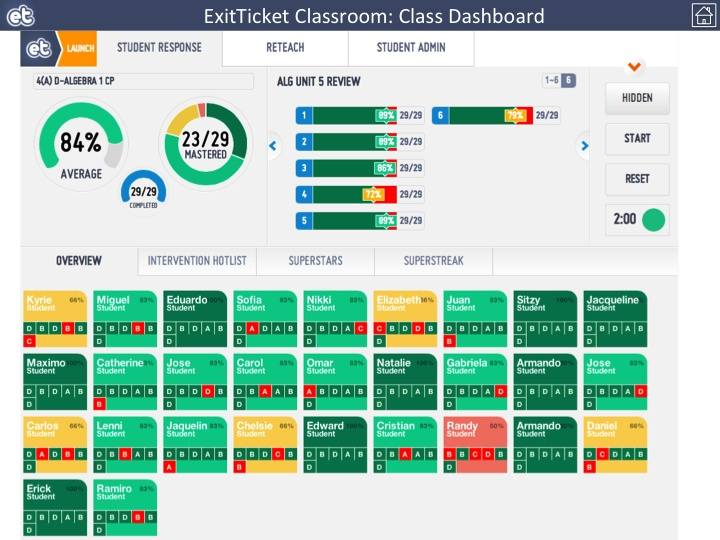 This is my FAVORITE tool I like to use in my classroom. Aside from the pretty colors, it gives the teacher, and the students, tremendous and immediate feedback! There is a student app for ExitTicket, but there is not a teacher app. There are 2 different modes--Presentation mode and Teacher mode. I leave the "Presentation Mode" on the front board as no student names are shown. Students can then see how the class is doing as a whole. I pull up "Teacher Mode" on Google Chrome on my iPad as I walk around the room. This allows me to see a heat map of how well the students are doing during the assessment. It allows me to step in and help a student if they are having difficulty as well.
 Like I said before the best part of ExitTicket is the data that you get back. Below is an image of the class data and question data that is returned to you and the students as they work through the questions.
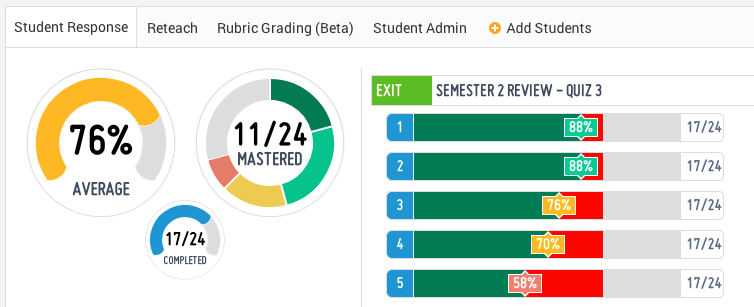
As evidenced by the data, I need to review questions 3-5, but I do not need to spend as much time on questions 1 and 2. This helps me plan my review. The class average gives the teacher a quick glance at how the students are doing on the review as well. The average is not too bad, but I should be worried about how many "mastered" the content.
2. Socrative - Online Quizzes, Exit Tickets, & Space Race

As the teacher, you can create multiple choice, true/false, and short answer questions. They have also added the function of being able to include an image with your question. Once the activity is complete, the teacher can download a report via email or through Excel. Teachers can use Socrative as an Entrance Ticket to check student prior knowledge, or they can use it as an Exit Ticket to see what the students learned during the day. My favorite feature is the Space Race. It really gets the competitive juices flowing for the students!
3. Kahoot is a FREE blended learning and online gaming platform that is available for all. If you have ever been to BW3s, you will find that Kahoot is similar to the NTN Buzztime game that they offer. Teachers can create their own multiple-choice questions that students must answer either by using their smartphones or their laptops.

Students will need to go to the web address: kahoot.it This will get them to the game lobby where they will input the game pin provided by the teacher.

They will then be prompted to insert a "nickname". Once all the students have given a nickname, the teacher may start the game. THIS is where the fun begins! Once the teacher starts the game, the students get to see the question for about 3 seconds, then the multiple-choice options will appear. Students will be rewarded points for each correct answer, PLUS how fast they answer the question. After all students have answered the question, then the top 5 scores will be displayed for all to see. Students really enjoy being able compete for the top 5 spots!
I wish you and your students the best of luck with the upcoming final exams!
I wish you and your students the best of luck with the upcoming final exams!


